

Your task organization tools
Stay organized and efficient with Inbox, Boards, and Planner. Every to-do, idea, or responsibility—no matter how small—finds its place, keeping you at the top of your game.
Boards
The Boards are the main private organizational unit of TaskMate. Boards are visible only to invited members of the Organization. Boards can be created or removed from the dashboard only by Admin and customized with a variety of beautiful background images.
Lists
The lists are board columns that contain ticket cards. They can be created and duplicated along with their cards, have editable titles and statuses, support drag-and-drop, and can be filtered within the board.
Card Details
The cards are the tickets created within lists. They support drag-and-drop within the same list or across lists, filters within the board, title editing, card duplication, rich-text descriptions, due date time picker, checklists, comments, attachments, priority settings, reporter and member assignment.
Boards
The Boards are the main private organizational unit of TaskMate. Boards are visible only to invited members of the Organization. Boards can be created or removed from the dashboard only by Admin and customized with a variety of beautiful background images.
Lists
The lists are board columns that contain ticket cards. They can be created and duplicated along with their cards, have editable titles and statuses, support drag-and-drop, and can be filtered within the board.
Card Details
The cards are the tickets created within lists. They support drag-and-drop within the same list or across lists, filters within the board, title editing, card duplication, rich-text descriptions, due date time picker, checklists, comments, attachments, priority settings, reporter and member assignment.
Your task management helpers
Manage your tasks efficiently .
Checklist
Create checklists for your tasks and projects with TaskMate's checklist feature. Mark tasks as complete and visualize and track progress by predefined colors and percentage completion.
Attachments
Add attachments to your tasks and projects with TaskMate's attachment feature. Upload files and images, preview images, and download attachments as needed.
Rich text editor
Create or update descriptions for your tasks and projects with TaskMate's description feature. Add more details or notes to your tasks and projects using a rich text editor, which allows to format text, add images, links, and more.
Checklist
Create checklists for your tasks and projects with TaskMate's checklist feature. Mark tasks as complete and visualize and track progress by predefined colors and percentage completion.
Attachments
Add attachments to your tasks and projects with TaskMate's attachment feature. Upload files and images, preview images, and download attachments as needed.
Rich text editor
Create or update descriptions for your tasks and projects with TaskMate's description feature. Add more details or notes to your tasks and projects using a rich text editor, which allows to format text, add images, links, and more.
Overview Statistics
Get an overview of the finished work
Monitor the capacity of your team
Get an overview of how work is being prioritized.
Get a snapshot of the status of your work items
View the activities of a particular board or organization
Visualize a snapshot of all stats
Finished work overview
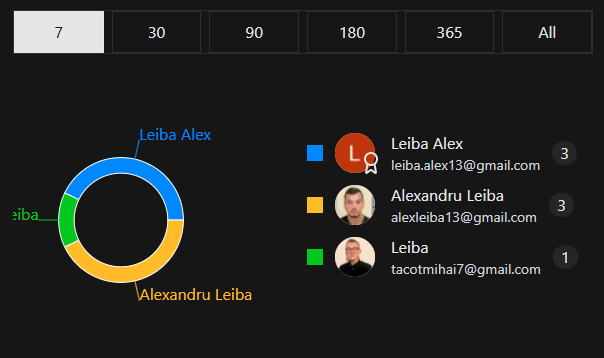
Get an overview of the finished work by each team member for a certain period of time. Filter by last number of days. By default is displayed all time finished work.
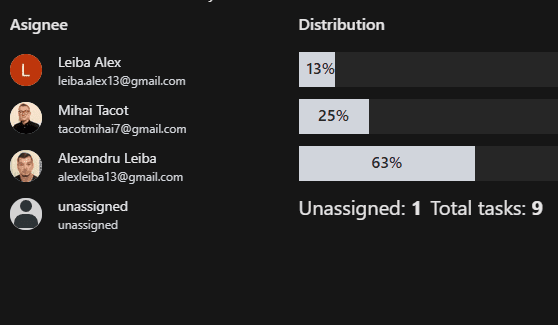
Team workload / Assigned work
Monitor the capacity of your team. Reassign work items to get the right balance. The workload is measured by unfinished work.
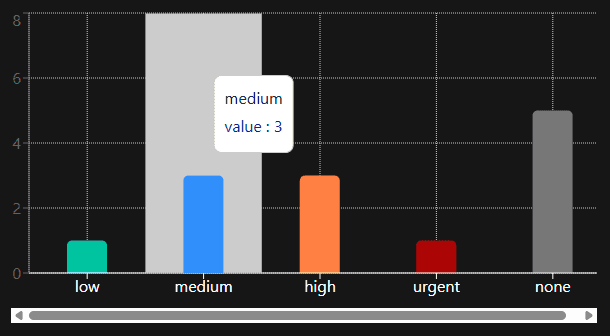
Priority breakdown
Get an overview of how work is being prioritized, The overview is calculated by only unfished card tickets.
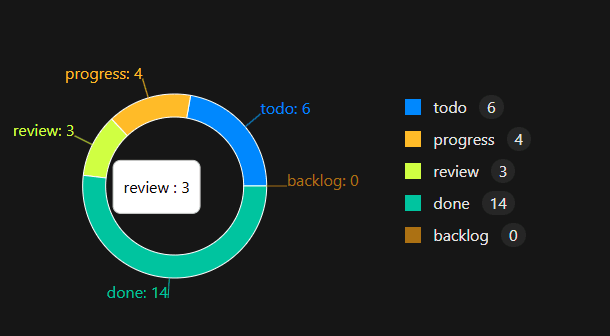
Status overview
Get a snapshot of the status of your work items, View all work items grouped by status
Do more with TaskMate (main features)
Customize the way you organize, prioritize, and handle your to-dos in a user friendly envronment that fits your style.
Recurring subscriptions
Reliable payment system with Stripe for recurring subscriptions and Plans. Payment system offers seamless and secure checkout process, cancel subscriptions, invoice history, invoice downloads and more.
Organizations
A private environment for invited members or owned Organizations where you can invite other members and manage their permissions within the Organization.
Role-based management
Manage invited member's role within the organization, this will prevent other members from deleting work items or from editing unnasigned to them work items.
Statistics
Overview the statistics of your board with TaskMate's statistics feature. Get an overview of the status of your work items, View all work items grouped by status, activity, boards and entire organizations.
Kanban view
Fully interactive kanban board with drag and drop functionality of all elements. Kanban view helps to visualize and prioritize tasks and projects in a more intuitive way, making it easier to manage and track workloads.
Table view
Fully functional and interactive Table view with multiple filter methods and interactive table cells which allows to interact, visualize, sort and take decisions much faster when dealing with multiple work items.
Drag and Drop
Drag and drop your tasks and projects with TaskMate's drag and drop feature. Move cards and lists around the board to create a more organized and efficient workflow.
Assignments
Assign tasks to members with TaskMate's assignment feature. Assign tasks to different members and track their progress.
Priority
Prioritize your tasks and projects with TaskMate's priority feature. Assign different priorities to tasks and projects to keep track of their importance and progress.
Filters
Filter your tasks and projects with TaskMate's filter feature. Apply different filters to view specific tasks and projects.
Attachments
Add attachments to your tasks and projects with TaskMate's attachment feature. Upload files and images, preview images, and download attachments as needed.
Comments
Comment any card with TaskMate's comments feature. Add comments to cards and track discussions.
Due date
Set due dates for your tasks and projects with TaskMate's due date feature. Keep track of deadlines and prioritize tasks accordingly.
Card and List Copy
Copy cards and lists with TaskMate's copy feature. Create new cards and lists by copying existing ones with their content.
Activity log
Any action within an Organization is registered under Activity page. Activities can be seen by any member of the Organization under any Card or on the Activity page.
Lorem ipsum dolor sit amet consectetur adipisicing elit. Nesciunt excepturi Lorem ipsum dolor sit amet consectetur adipisicing elit. Nesciunt excepturi Lorem ipsum dolor sit amet consectetur adipisicing elit. Nesciunt excepturi ipsum dolor sit amet consectetur adipisicing elit. Nesciunt excepturi ipsum dolor sit amet consectetur adipisicing elit. Nesciunt excepturi ipsum dolor sit amet consectetur adipisicing elit. Nesciunt excepturi

75 % of companies improved sales in the first month using TaskMate
Lorem ipsum dolor sit amet consectetur adipisicing elit. Nesciunt excepturi Lorem ipsum dolor sit amet consectetur adipisicing elit. Nesciunt excepturi Lorem ipsum dolor sit amet consectetur adipisicing elit. ipsum dolor sit amet consectetur adipisicing elit. Nesciunt excepturi Nesciunt excepturi ipsum dolor sit amet consectetur adipisicing elit. Nesciunt excepturi

50 % of organizations increased sales in the first year using TaskMate
Lorem ipsum dolor sit amet consectetur adipisicing elit. Nesciunt excepturi Lorem ipsum dolor sit amet consectetur adipisicing elit. Nesciunt excepturi ipsum dolor sit amet consectetur adipisicing elit. Nesciunt excepturi ipsum dolor sit amet consectetur adipisicing elit. Nesciunt excepturi

90 % of customers accelerated their work process using TaskMate
Lorem ipsum dolor sit amet consectetur adipisicing elit. Nesciunt excepturi Lorem ipsum dolor sit amet consectetur adipisicing elit. Nesciunt excepturi ipsum dolor sit amet consectetur adipisicing elit. Nesciunt excepturi ipsum dolor sit amet consectetur adipisicing elit. Nesciunt excepturi
75 % of companies improved sales in the first month using TaskMate
Lorem ipsum dolor sit amet consectetur adipisicing elit. Nesciunt excepturi Lorem ipsum dolor sit amet consectetur adipisicing elit. Nesciunt excepturi ipsum dolor sit amet consectetur adipisicing elit. Nesciunt excepturi ipsum dolor sit amet consectetur adipisicing elit. Nesciunt excepturi
90 % of customers accelerated their work process using TaskMate